


Featured ChoiceSave 36%

Save 27%

Save 39%


Save 30%

Save 50%

Save 32%



Save 50%
Save 39%
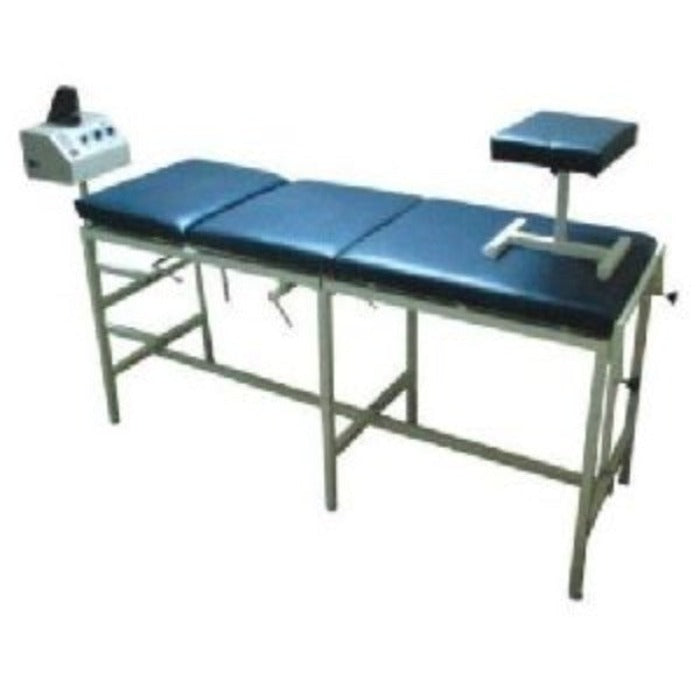
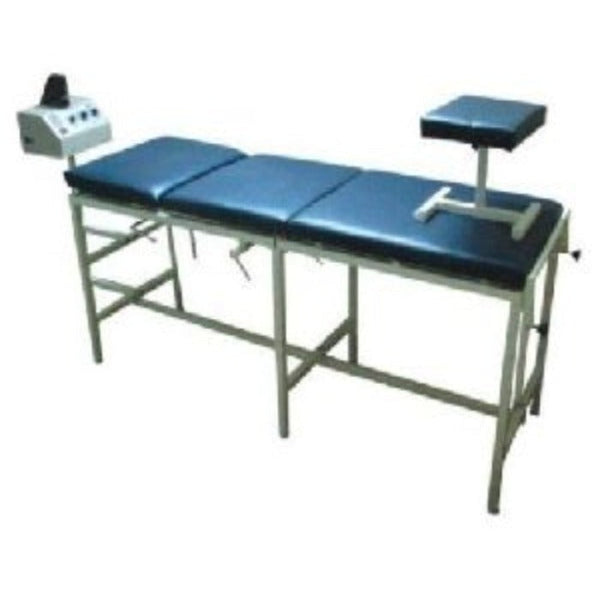
Traction Machines for Cervical & Lumbar Physiotherapy
Traction Machines for Cervical & Lumbar Physiotherapy
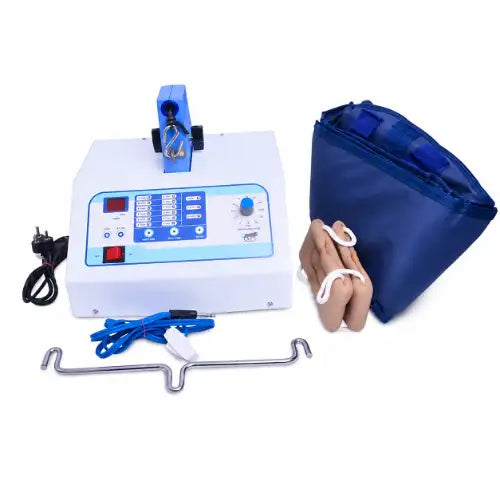
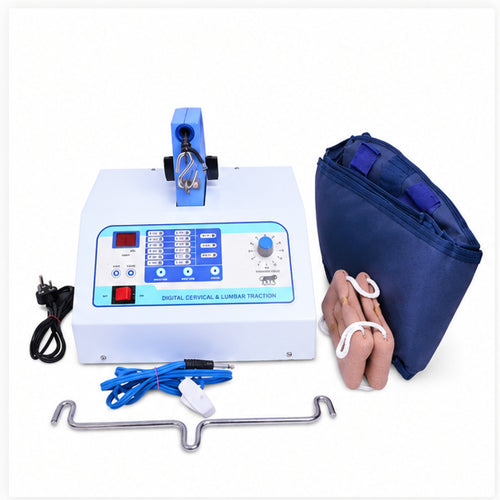
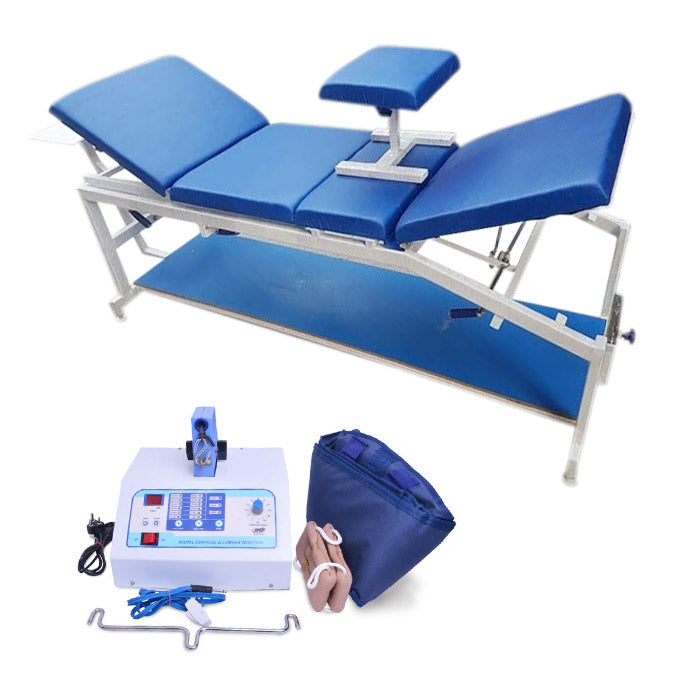
Traction Machines for Cervical & Lumbar Physiotherapy provide a controlled treatment platform for physiotherapy professionals who use cervical and lumbar traction as part of a supervised rehabilitation programme. The digital traction system combines an electronic traction controller with a dedicated 3-fold treatment table. This combination gives the practitioner a structured setup for positioning the patient and managing treatment settings during a session.
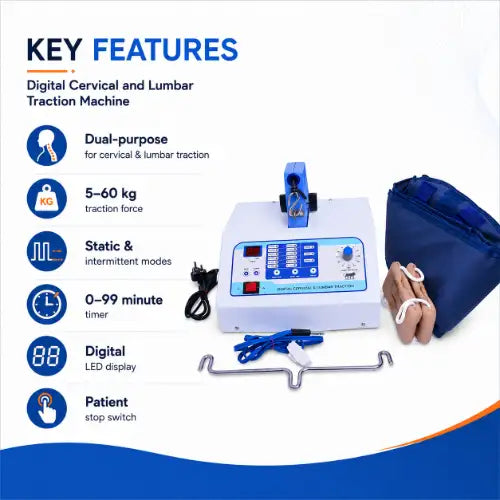
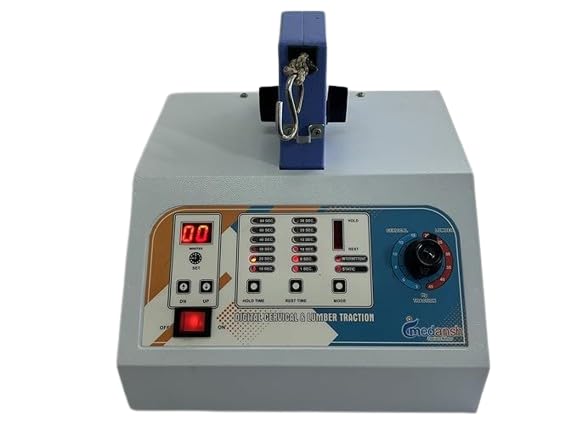
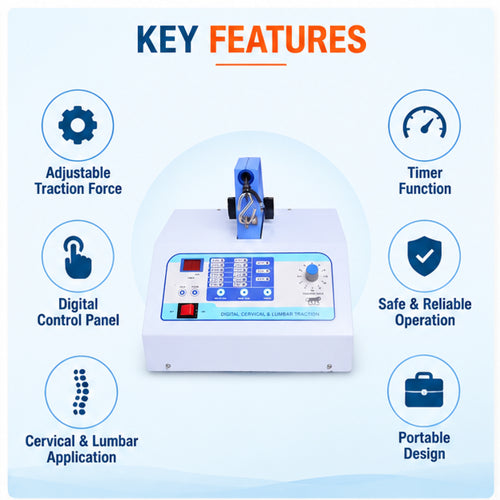
The system is designed for both cervical traction and lumbar traction. Operators can adjust traction force, base force, hold times and total treatment duration according to the prescribed therapy plan. The digital LED display helps the practitioner monitor the selected settings during treatment. In addition, the machine includes stored treatment patterns and a patient-held stop switch for added treatment control.
Because traction involves controlled force applied to the cervical or lumbar region, professional assessment remains important. A physiotherapist or doctor should determine whether traction is suitable for a particular patient and should select the appropriate treatment settings. Users should not independently guess traction force, treatment duration or positioning.
The complete setup is particularly suitable for physiotherapy clinics, rehabilitation centres, hospitals and supervised professional treatment environments. It can also be considered for a home physiotherapy setup when a qualified healthcare professional has recommended traction and can supervise the treatment appropriately.


Product Overview
A cervical and lumbar traction machine applies a controlled pulling force while the patient rests on a dedicated treatment table. The digital controller allows the operator to select the main traction force and lower base force. The system also provides adjustable hold periods and a treatment timer, allowing the practitioner to configure different traction patterns according to the therapy plan.
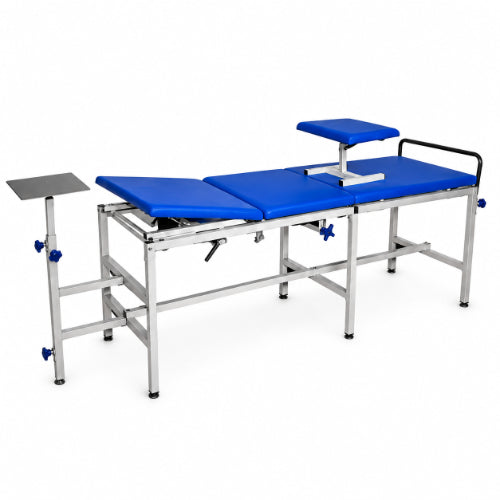
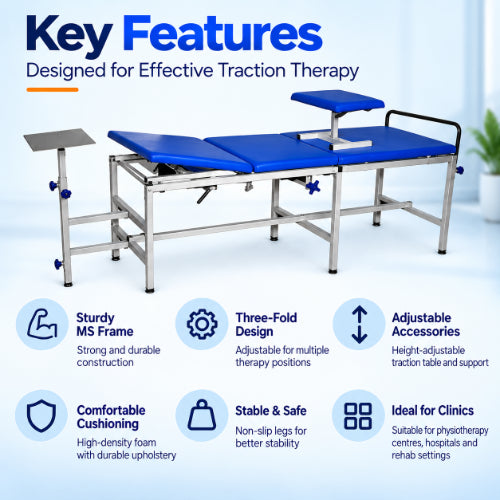
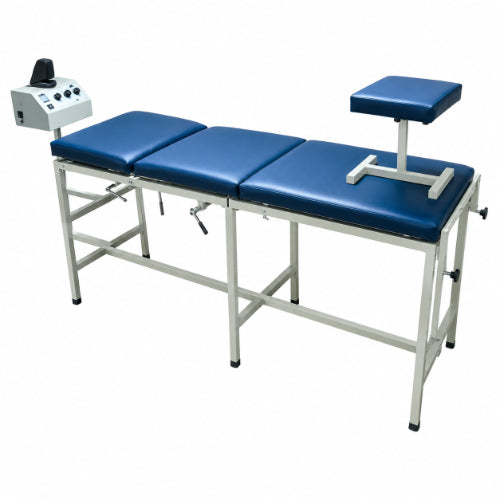
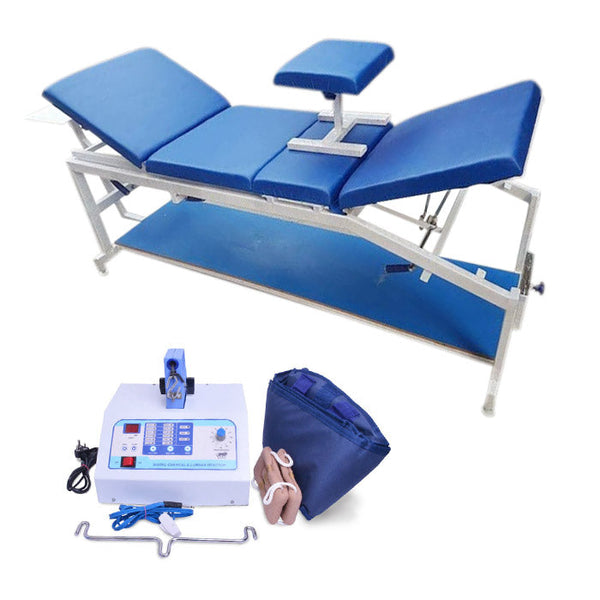
This model combines the traction controller with a 3-fold traction table. The table provides a stable treatment surface and supports patient positioning for cervical and lumbar applications. Its steel frame provides a strong base, while the padded rexine-covered top provides a treatment surface designed for physiotherapy use.
The digital design also supports repeatable treatment settings. Up to 30 treatment patterns can be stored in the machine's memory. This feature can help a practitioner access commonly used programmes without manually entering every setting for each session.
Another important feature is auto-tension adjustment. During treatment, the system is designed to help maintain the selected traction force. The patient-held stop switch provides an additional method of stopping the session when necessary.
For professional physiotherapy practices, this combination of digital controls and a dedicated traction table can help create a more organised treatment environment. The machine supports both cervical and lumbar modes, making it suitable for practices that need one traction system for different spinal therapy applications.
Meddey also lists two more traction machine models for practices that prefer a different controller: the Medansh digital cervical and lumbar unit and the Medansh Delux digital unit.

Key Features of Traction Machines for Cervical & Lumbar Physiotherapy
The digital traction system combines adjustable treatment controls with a full 3-fold physiotherapy table. Its main features include:
- Cervical and lumbar operation: Supports traction applications for the neck and lower back.
- Adjustable traction force: The main traction force can be selected from 5 kg to 60 kg.
- Adjustable base force: The base force can be adjusted from 0 kg to 54 kg.
- Adjustable hold time: Traction and base-force hold periods can be selected from 0 to 99 seconds.
- Treatment timer: Treatment duration can be selected from 0 to 99 minutes.
- 30 stored treatment patterns: The system can store up to 30 treatment patterns in memory.
- Digital LED display: Important treatment settings can be viewed on the digital display.
- Auto-tension adjustment: The system helps maintain the selected traction force during treatment.
- Patient stop switch: A hand-held switch gives the patient a direct method to stop the session when required.
- 3-fold treatment table: Provides a dedicated surface for cervical and lumbar traction.
- Steel frame: The treatment table uses a steel frame for structural support.
- Padded rexine top: The table provides a padded treatment surface for patient positioning.
These features make the system suitable for professional physiotherapy environments where controlled settings and repeatable treatment procedures are important.
Digital Control for Cervical and Lumbar Traction
The digital controller is one of the central parts of this traction machine for physiotherapy. It allows the operator to manage the main treatment variables from the control unit. Instead of relying only on manual adjustment, the practitioner can enter the required force, hold periods and treatment time using the machine's digital controls.
The main traction force ranges from 5 kg to 60 kg. It also provides a base-force range from 0 kg to 54 kg. The base force can support intermittent traction programmes in which the machine moves between the selected traction force and a lower force level.
The hold-time settings provide further control. Both traction hold time and base hold time can be selected between 0 and 99 seconds. The total treatment timer can be set between 0 and 99 minutes.
The LED display provides a clear way to view the selected treatment parameters. This helps the operator check the settings before and during a session. The machine also includes graphical indication of the traction mode, supporting easier monitoring of the selected treatment pattern.
With up to 30 stored treatment patterns, the system can support repeat sessions where the practitioner frequently uses established treatment settings. However, stored programmes should still be reviewed before use because treatment requirements can vary from one patient and session to another.
Cervical Traction Machine for Neck Physiotherapy
Cervical traction refers to a controlled traction technique applied to the neck region. A professional physiotherapist assesses the patient and determines whether cervical traction forms an appropriate part of the treatment plan. When prescribed, the practitioner positions the patient correctly and selects the required traction parameters.
This digital system supports cervical mode operation and provides adjustable traction force and treatment time. The dedicated treatment table gives the practitioner a stable surface for positioning the patient before the traction session begins.
Professional use can be particularly useful when a physiotherapy clinic needs a single traction system that supports both neck and lower-back applications. The digital controls allow the practitioner to adjust settings rather than relying on a fixed treatment level.
Patients should not select cervical traction settings without professional guidance. The correct force, treatment duration and positioning depend on the patient's condition and the treatment plan prepared by a qualified healthcare professional.
The patient stop switch adds an additional control during treatment. If the patient experiences unusual discomfort, the session can be stopped using the hand-held switch, after which the practitioner can assess the situation and decide on the appropriate next step.
For neck-focused sessions, Meddey also lists the Cervical Traction Device for Guided Neck Therapy and the Lumbar & Cervical Traction Unit (Manual).


Lumbar Traction Machine for Lower-Back Physiotherapy
Lumbar traction uses controlled traction in the lower-back region under professional supervision. This system supports lumbar operation and provides adjustable force, base force and treatment time. The 3-fold table provides a dedicated treatment surface for patient positioning.
The ability to select different traction settings allows the practitioner to create a treatment programme based on the prescribed therapy plan. The machine can also support intermittent traction through the use of traction and base-force settings with adjustable hold times.
For physiotherapy clinics, a digital lumbar traction machine can form part of a wider rehabilitation setup. The practitioner can combine traction with other suitable physiotherapy methods when clinically appropriate. However, each treatment method should follow professional assessment and the patient's individual rehabilitation plan.
The machine should not be treated as a general exercise device. Its purpose is controlled physiotherapy traction, so proper positioning, professional supervision and appropriate settings remain important throughout the treatment process.
Practices that want a complete lower-back traction machine setup can also look at the Three Fold Traction Bed for Cervical & Lumbar Physiotherapy or the Medansh Delux digital traction unit.
Technical Specifications
The following specifications describe the digital cervical and lumbar traction system with its 3-fold treatment table:
| Specification | Details |
|---|---|
| Product Type | Digital cervical and lumbar traction machine with 3-fold table |
| Traction Area | Cervical and lumbar |
| Traction Force | 5–60 kg |
| Base Force | 0–54 kg |
| Traction Hold Time | 0–99 seconds |
| Base Hold Time | 0–99 seconds |
| Treatment Time | 0–99 minutes |
| Programme Memory | Up to 30 stored treatment patterns |
| Display | Digital LED display |
| Safety Control | Patient-held stop switch |
| Table Type | 3-fold traction table |
| Table Length | 80 inches |
| Table Width | 22 inches |
| Table Height | Adjustable up to 24 inches |
| Frame | Steel |
| Table Top | Padded rexine-covered surface |
| Brand | Medansh |
| Country of Origin | India |
| Warranty | 1 Year |
What Does the Complete Traction System Include?
The complete setup combines the main digital controller with the treatment table and patient safety control. Each part contributes to the overall physiotherapy setup.
Digital Traction Controller
The digital traction controller manages the selected traction force, base force, hold times and treatment duration. It also provides access to stored treatment patterns and displays important settings through the LED interface.
3-Fold Physiotherapy Table
The 3-fold table provides a dedicated surface for cervical and lumbar traction. Its steel frame supports the treatment structure, while the padded rexine top provides a suitable surface for patient positioning.
Patient Stop Switch
The hand-held patient stop switch provides an additional treatment control. The patient can use the switch to stop the session when required, allowing the practitioner to assess the patient's response.
The combination of these components creates a complete traction treatment station rather than a standalone traction controller.
How a Digital Traction Machine Works
A digital traction machine applies a controlled pulling force while the patient rests on the treatment table. The healthcare professional first evaluates the patient and determines whether cervical or lumbar traction is appropriate. After that, the practitioner positions the patient and selects the required treatment parameters.
The main traction force can be selected within the machine's specified range. The operator can also select a base force and define the hold periods. This allows the machine to support different traction patterns, including intermittent programmes where the system alternates between the main traction force and a lower base force.
The treatment timer controls the overall session duration. Once the treatment programme is configured, the operator can monitor the digital display and observe the patient's response throughout the session.
The auto-tension feature helps maintain the selected traction force during treatment. The patient stop switch adds another level of control by allowing the patient to stop the session if unusual discomfort occurs.
The machine should always operate according to professional instructions. It should not replace clinical assessment or encourage patients to select treatment settings without guidance.
Uses of Traction Machines for Cervical & Lumbar Physiotherapy
This traction system can support supervised physiotherapy programmes where a qualified professional has selected traction as an appropriate treatment technique. Common professional use environments include:
- Physiotherapy clinics: Suitable for practices that provide supervised cervical and lumbar traction sessions.
- Rehabilitation centres: Can form part of a broader rehabilitation equipment setup.
- Hospitals: Useful where professional physiotherapy services require dedicated traction equipment.
- Physiotherapy studios: The complete table-and-controller setup can support a dedicated therapy area.
- Supervised home therapy: May be considered when a qualified professional recommends a complete home traction setup and provides appropriate guidance.
The system may be selected for patients undergoing professional management of conditions involving the neck or lower back when the treating clinician determines that traction is appropriate. The machine itself does not diagnose or treat the underlying cause of spinal symptoms. Instead, it provides a controlled platform for a prescribed traction technique.
For this reason, professional evaluation remains an important part of the treatment process. The practitioner should decide the treatment area, patient position, traction force, hold time and overall duration.
Benefits of the 3-Fold Traction Table Design
The 3-fold table is an important part of the complete system. It provides a dedicated treatment surface instead of requiring the traction controller to be attached to a separate general-purpose table.
The table measures approximately 80 inches in length and 22 inches in width. Its height can be adjusted up to approximately 24 inches according to the listed specifications. The steel frame provides the structural base, while the padded rexine top supports patient positioning during treatment.
A dedicated table can make the treatment area more organised. It also gives the practitioner a defined surface for setting up cervical and lumbar traction sessions.
Before installation, clinics and home users should measure the available room. The table itself needs sufficient space, but the operator also needs clear working space around the treatment area.
When planning installation, consider the following:
- Available room length and width.
- Clear movement space around the table.
- Easy access to the traction controller.
- Convenient patient entry and positioning.
- Suitable electrical access for the digital machine.
- A safe and organised area for physiotherapy treatment.
If you need a different traction machine table format, Meddey also lists the Three Fold Traction Bed for Cervical & Lumbar Physiotherapy, the Traction Cervical, Lumbar with 4 Fold Table and the High Low Traction Four Fold Bed Electric.


Setting Up the Traction Machine in a Physiotherapy Clinic
A professional clinic should place the cervical and lumbar traction machine in a clean, spacious treatment area. The operator should have easy access to the digital controller and patient stop switch throughout the session.
Before treatment, inspect the table and machine. Check that the treatment surface is clean and that the equipment appears ready for use. The practitioner should then prepare the patient according to the prescribed treatment plan.
Once the patient is positioned correctly, the operator can select the required mode and treatment parameters. The digital display allows the operator to review the selected settings. The patient stop switch should remain accessible during treatment.
After the session, the practitioner should end the programme according to the operating procedure and help the patient leave the table safely. The treatment surface should then be cleaned and prepared for the next session.
A structured setup can help maintain a consistent workflow. However, the exact clinical procedure should follow the manufacturer's instructions and the professional's treatment protocol.
Can You Use a Traction Machine at Home?
Some professional physiotherapy equipment can be installed in a home setting. However, this digital traction system is significantly larger than a small portable therapy device because it includes a full 3-fold treatment table.
For home use, a physiotherapist or doctor should first determine whether traction is appropriate. The healthcare professional should also select the correct treatment settings and explain how the system should be operated.
Home buyers should measure the available room before purchasing. The table is approximately 80 inches long and 22 inches wide, so sufficient space is necessary. In addition, the operator needs room to move around the table and access the controller.
Before installing the system at home, consider these points:
- Confirm that a qualified healthcare professional has recommended traction.
- Identify who will operate and supervise the machine.
- Measure the available room and working space.
- Ensure easy access to the patient stop switch.
- Keep the controller and table area organised.
- Follow the manufacturer's operating instructions.
- Never guess the traction force or treatment duration.
A home installation should therefore function as a supervised physiotherapy setup rather than as an unsupervised general-use exercise device.
How to Use a Cervical & Lumbar Traction Machine
The following is a general workflow for professional use. Always follow the manufacturer's instructions and the treatment plan provided by the qualified healthcare professional.
- Assess the patient: Confirm that the practitioner has selected traction as an appropriate treatment technique.
- Prepare the treatment area: Ensure the 3-fold table and surrounding area are clean and free from unnecessary obstacles.
- Position the patient: Place the patient correctly on the treatment table according to the selected cervical or lumbar treatment.
- Check the equipment: Confirm that the traction controller and patient stop switch are accessible and ready for use.
- Select the treatment mode: Choose the required cervical or lumbar mode according to the treatment plan.
- Set the traction force: Enter the force selected by the treating professional.
- Set the base force: If the treatment plan requires a base-force setting, enter the appropriate value.
- Set hold times: Select the required traction and base-force hold periods.
- Set treatment duration: Enter the prescribed treatment time.
- Review the display: Check the digital LED display before starting the session.
- Begin treatment: Start the programme and monitor the patient's response.
- Use the stop switch when necessary: Stop the session if the patient experiences unusual discomfort or if the practitioner determines that treatment should end.
- Complete the session: End the programme according to the operating instructions and assist the patient safely.
- Clean the treatment area: Prepare the table for the next patient.
These steps provide a general workflow rather than a substitute for professional clinical training. The exact treatment method should always follow the manufacturer's instructions and the clinician's protocol.
Safety and Professional Use Guidelines
Traction applies controlled force to the body, so professional assessment and correct operation are essential. This machine should not encourage self-diagnosis or unsupervised selection of treatment parameters.
Before using the machine, the treating professional should assess the patient's condition and determine whether cervical or lumbar traction is suitable. The practitioner should also decide the appropriate force, treatment time, positioning and traction pattern.
Important points include:
- Use the machine under qualified professional supervision.
- Do not select traction force without professional instruction.
- Do not extend treatment time beyond the prescribed setting.
- Position the patient correctly before starting traction.
- Keep the patient stop switch accessible during treatment.
- Monitor the patient's response throughout the session.
- Stop treatment if unusual discomfort occurs and assess the patient.
- Follow the manufacturer's operating and maintenance instructions.
- Keep the treatment table clean between sessions.
- Inspect the equipment regularly before professional use.
Patients with a known medical condition should discuss traction with their doctor or physiotherapist before treatment. The suitability of traction depends on the individual patient and should not be assumed from symptoms alone.
Care and Maintenance
Regular care can help maintain a clean and organised physiotherapy treatment environment. The machine and table should be handled according to the manufacturer's instructions.
Clean the Treatment Surface
Clean the padded rexine-covered table surface between patients using an appropriate cleaning method recommended for the material. Avoid harsh products that could damage the table covering.
Inspect the Table
Check the steel frame, table sections and visible components regularly. Look for signs of damage, looseness or unusual movement before starting treatment.
Check the Controller
Review the digital controller before use. Confirm that the display functions correctly and that the selected controls respond as expected.
Keep the Safety Switch Accessible
The patient stop switch should remain accessible during treatment. Avoid placing equipment or accessories where they could block access to the switch.
Follow Manufacturer Instructions
For technical servicing, electrical checks and any repair work, follow the manufacturer's instructions and use qualified service support where required.
Who Can Consider This Traction Machine?
The system is designed around professional physiotherapy use. It can be considered by healthcare facilities that require controlled cervical and lumbar traction equipment with an integrated treatment table.
Potential users include:
- Physiotherapy clinics.
- Rehabilitation centres.
- Hospitals with physiotherapy departments.
- Professional physiotherapy studios.
- Rehabilitation facilities.
- Home users who have received professional guidance and have sufficient space for the complete setup.
The digital controls and stored treatment patterns can be useful for practices that perform repeated traction sessions. Meanwhile, the 3-fold table provides a dedicated treatment surface for patient positioning.
Before purchasing, clinics should consider their available room, expected patient requirements, professional operating capacity and the treatment protocols they intend to follow.
For other supervised therapy equipment, browse Physiotherapy Exercise Equipment & Rehabilitation Tools and TENS Machine & Electrotherapy Devices.
Why Choose Digital Traction Equipment for Physiotherapy?
Digital traction equipment provides a more structured approach to managing treatment parameters. The operator can select the required traction force, base force, hold times and treatment duration from the digital controller. This makes the system suitable for professional settings where treatment parameters need to be clearly defined.
The 30-program memory can also make repeated treatment workflows easier to manage. Instead of entering every parameter from the beginning for a commonly used treatment pattern, the operator can access a stored programme and review it before use.
The LED display supports visibility of the selected settings. At the same time, auto-tension adjustment helps maintain the selected traction force during treatment.
Another advantage is the combination of the controller and 3-fold treatment table. The clinic receives a dedicated traction setup rather than needing to combine a separate machine with a general treatment bed.
These features make the system a practical option for professional physiotherapy environments that need cervical and lumbar traction machine capabilities in one setup.
Things to Check Before Buying a Traction Machine
Choosing a traction machine involves more than comparing the machine price. A clinic should review the technical specifications, table dimensions, treatment controls and intended use before placing an order.
Consider the following factors:
- Traction range: Check whether the available force range matches the professional requirements of the clinic.
- Base-force range: Review the lower-force settings available for intermittent traction programmes.
- Hold-time control: Check the available traction machine and base-force hold periods.
- Treatment timer: Confirm that the available treatment duration suits the clinic's treatment protocols.
- Programme memory: Consider whether stored treatment patterns will be useful for repeated sessions.
- Display: A clear digital display can make treatment parameters easier to monitor.
- Patient stop switch: Check that the patient can access the safety control during treatment.
- Table dimensions: Measure the available room before ordering the complete system.
- Table construction: Review the frame and treatment surface specifications.
- Warranty: Check the warranty period and available support before purchase.
For professional use, the machine should match the clinic's treatment requirements and operating environment. A qualified physiotherapist should also be involved when deciding whether the equipment is appropriate for the intended therapy services.
Frequently Asked Questions
What is a cervical and lumbar traction machine?
A cervical and lumbar traction machine is physiotherapy equipment designed to provide controlled traction machine for the neck and lower-back regions. This model combines a digital traction machine controller with a 3-fold treatment table.
Can this machine be used for both cervical and lumbar traction?
Yes. The system supports both cervical and lumbar traction machine modes, allowing professional users to configure the machine according to the selected treatment plan.
What is the traction machine force range?
The listed main traction machine force range is 5 kg to 60 kg. The appropriate setting should always be selected by a qualified healthcare professional.
What is the base-force range?
The base-force range is 0 kg to 54 kg. The practitioner can use the available settings according to the prescribed traction mahcine programme.
How long can the treatment timer be set?
The treatment timer can be adjusted from 0 to 99 minutes according to the listed specifications and the professional treatment plan.
Does the machine have stored programmes?
Yes. The digital traction machine can store up to 30 treatment patterns in its memory.
Does the machine have a safety stop?
Yes. The system includes a hand-held patient stop switch that provides an additional method of stopping the treatment session when required.
What are the table dimensions?
The listed table dimensions are approximately 80 inches in length and 22 inches in width. The table height is listed as adjustable up to approximately 24 inches.
Can this traction machine be installed at home?
A home installation may be possible when a qualified healthcare professional recommends the equipment and provides appropriate supervision. Buyers should also confirm that their room has enough space for the full 3-fold table and working area.
Is this machine suitable for unsupervised use?
This is professional physiotherapy equipment. Treatment settings should not be guessed or selected without appropriate professional guidance. A physiotherapist or doctor should determine whether traction machine is suitable and select the treatment parameters.
Conclusion
Traction physiotherapy machine for Cervical & Lumbar Physiotherapy provide a dedicated digital solution for supervised cervical and lumbar traction. The system combines adjustable traction machine force, base force, hold times and treatment machine duration with a digital LED display, stored treatment machine patterns and auto-tension adjustment.
The integrated 3-fold traction machine table adds a complete treatment machine platform for professional physiotherapy environments. Its steel frame, padded rexine-covered surface and adjustable height support the practical requirements of a dedicated traction area.
With a 5–60 kg traction machine force range, 0–54 kg base-force range, 0–99 second hold settings, 0–99 minute treatment machine timer and memory for up to 30 treatment machine patterns, the system provides multiple controls for structured treatment machine programmes. The patient-held stop switch adds another important control during sessions.
This cervical and lumbar traction machine can be considered for physiotherapy clinics, rehabilitation centres, hospitals and supervised therapy setups. Home users should first consult a qualified healthcare professional and ensure that the complete table-based system fits safely within the available space.
As with all professional physiotherapy equipment, correct patient assessment, positioning, treatment machine selection and operating procedures remain essential. The machine should be used according to professional guidance and manufacturer instructions rather than as an unsupervised self-treatment machine device.
Product Highlights at a Glance
- Digital traction system for cervical and lumbar physiotherapy.
- Adjustable main traction force from 5 kg to 60 kg.
- Adjustable base force from 0 kg to 54 kg.
- Traction and base hold time from 0 to 99 seconds.
- Treatment machine timer from 0 to 99 minutes.
- Memory for up to 30 stored treatment machine patterns.
- Digital LED display for treatment machine parameters.
- Auto-tension adjustment for controlled traction force.
- Hand-held patient stop switch.
- Integrated 3-fold physiotherapy traction table.
- 80-inch table length and 22-inch table width.
- Steel-frame construction with padded rexine-covered top.
- Suitable for professional physiotherapy and rehabilitation environments.
- Medansh brand with listed 1-year warranty.
Important: Traction physiotherapy machine treatment machine should be selected and configured by a qualified healthcare professional. Product specifications and availability may change, so verify the latest information before purchase.
Explore Medical Collections
All Categories
Abdominal & Maternity Support

Accessories

Accu-Chek Instant Strips: Use, Compatibility, Price & Blood Sugar Testing Guide
Accu-Chek Instant Strips: Uses, Features & Complete Guide

accupuncture

Acupuncture Needles & Supplies

Advanced Physiotherapy Machines & Lumbar Physiotherapy

Airways

Alcohol Swab: Uses, Safe Use and Disposal Guide
Ambu Bag Full Form: Is There an Official Meaning?

Ambu Bag: Parts, Uses and Safety Guide
Ambu Full Form: What the Name Means and BVM Basics

Ambulance

Anatomy Models
Anesthesia Machine
You may also need
FOR YOURecommended for you
Save 36%
Save 27%
Save 39%
Save 30%
Save 39%
Save 50%
Save 32%
Save 50%